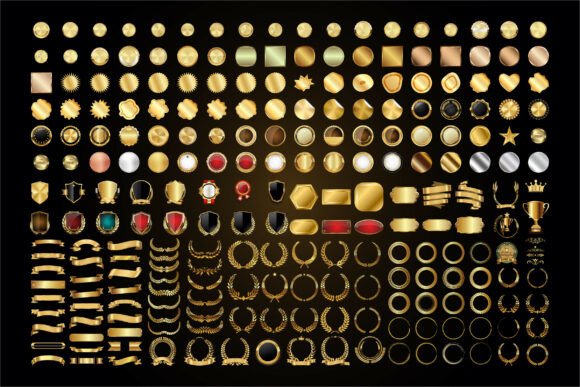
236 Golden Decorative Emblem Label Set: Elevate Your Designs with Premium Quality
In the world of digital design, the difference between a project that feels mass-produced and one that commands attention often comes down to the details. The 236 Golden Decorative Emblem Label Set is designed specifically for creators who understand that nuance matters. Whether you are crafting an award certificate, designing luxury packaging, or building a brand identity that needs to convey prestige, this collection offers a robust library of assets including laurel wreaths, ribbons, shields, medals, frames, seals, crowns, and trophy icons. However, simply downloading a large file pack does not guarantee a professional result. To truly leverage these assets, you must understand how to apply them correctly and avoid common pitfalls that can undermine your hard work.
Understanding the Value of a Comprehensive Asset Pack
Many designers fall into the trap of searching for single, isolated elements when they should be investing in cohesive collections. The 236 Golden Decorative Emblem Label Set provides 236 distinct files across multiple formats—SVG, PNG, EPS, AI, and DXF. This variety is not just about quantity; it is about versatility. A professional workflow requires flexibility. You might need a high-resolution PNG for a social media post, a scalable SVG for a website logo, or an editable AI file to customize colors in Adobe Illustrator. Having all these formats ready ensures you are never forced to compromise on quality due to format limitations.
This set is particularly valuable for those working on cinematic projects, festival branding, or recognition ceremonies where the visual language of "gold" signifies victory, honor, and achievement. When used correctly, these emblems transform a standard document into a symbol of distinction. They serve as the visual anchor for concepts like success, champion status, and premium quality.
Common Mistakes That Dilute Professional Results
Even with high-quality assets, poor execution can ruin the final presentation. One of the most frequent errors I see is the indiscriminate use of golden textures without considering the background contrast. Placing a bright gold emblem on a white background can sometimes look flat or washed out if the lighting effects aren't adjusted. Conversely, using complex, highly detailed emblems on busy backgrounds creates visual noise that distracts from the message. The goal is elegance, not clutter.
Another significant oversight is ignoring the file format requirements for specific tools. Beginners often download the entire package and attempt to open every file type in software that doesn't support it, leading to frustration and corrupted data. For instance, trying to edit a rasterized PNG in a vector program will yield poor results because you cannot scale it up without losing clarity. Understanding which file serves which purpose is critical for efficiency.
Furthermore, many users fail to customize the elements to match their brand's specific tone. Using a generic "gold" color straight from the template can make a design look cheap or stock-standard. True luxury comes from subtle adjustments—altering gradients, tweaking line weights, or combining different elements from the set to create something unique rather than relying on a pre-made composition.
How File Formats Impact Your Workflow
The technical specifications of the 236 Golden Decorative Emblem Label Set are designed to cover almost every scenario, but only if you know how to utilize them. Let's break down why choosing the wrong format can cost you time and quality.
- SVG Files: These are essential for web design and cutting machines like Cricut Design Space, Silhouette Designer Edition, Sure Cuts A Lot (SCAL), and Brother ScanNCut. If you are creating physical cutouts or digital badges, SVG ensures crisp edges at any size. Using a low-res image here would result in jagged lines and wasted material.
- DXF Files: Specifically tailored for Silhouette Studio Basic Edition, these files allow for precise cutting paths. Ignoring this format when using basic cutting software can lead to compatibility issues.
- EPS and AI Files: These are the industry standards for professional graphic design in CorelDraw, Inkscape, and Adobe Illustrator. They allow you to deconstruct the emblem, change colors, and resize infinitely. Relying solely on PNGs for print projects can lead to pixelation when scaled for large banners or posters.
- PNG Files: Perfect for quick overlays on presentations or social media graphics where transparency is key. However, do not use these for large-scale printing or further vector editing.
Strategic Application for Maximum Impact
To get the most out of this collection, consider the context of your project before selecting an emblem. If you are designing a film festival poster, a shield or crown icon might convey authority and tradition. For a corporate achievement award, a clean laurel wreath or ribbon often communicates respect and honor more effectively than a flashy trophy.
A practical approach involves layering. Instead of placing a single large emblem in the center, try using smaller seal icons as corner accents or watermarks. This technique adds depth and sophistication without overwhelming the text or main imagery. Remember, the best designs often leave room to breathe. Overcrowding a certificate with too many decorative elements can make it look chaotic rather than celebratory.
Color consistency is another area where precision matters. While the set features premium gold tones, ensure these align with your overall palette. If your brand uses a deep navy blue, the gold should have a warm undertone to complement it, not clash with it. Adjusting the opacity or blending modes in your design software can help integrate these emblems seamlessly into your layout.
What to Check Before Finalizing Your Decision
Before integrating these assets into a client project or a personal launch, take a moment to verify a few key details. First, inspect the scalability. Zoom in on the vector files to ensure the intricate details of the ribbons and wreaths remain sharp. Second, check the transparency on the PNG files to ensure there are no unwanted white borders around the edges, which can happen with lower-quality exports.
Also, consider the licensing and usage rights for your specific needs. While this set is ideal for branding, awards, certificates, packaging, logos, posters, and elegant design projects, always confirm that your intended use aligns with the license terms provided by the creator. This protects you and your clients from potential legal complications down the road.
If you encounter any issues during the download or installation process, remember that support is available. Technical glitches can happen, but they are usually solvable with a little guidance. Don't hesitate to reach out if a file won't open or if you need clarification on how to use a specific format in your preferred software.
Final Thoughts on Building a Premium Brand Identity
The 236 Golden Decorative Emblem Label Set is more than just a collection of images; it is a toolkit for establishing authority and elegance in your visual communication. By avoiding common mistakes like format misuse, poor contrast, and lack of customization, you can transform these assets into powerful design elements that resonate with your audience. Whether you are a freelancer creating a custom logo, a small business owner designing product packaging, or an educator preparing a graduation ceremony, the right emblem can elevate the perceived value of your work instantly.
Take the time to explore each file, experiment with different combinations, and refine your application. The effort you put into understanding these tools will pay off in the quality of your final output. Thank you for visiting our shop, and we hope these resources help you achieve your creative goals. Please review our products if you found them helpful, and return soon for more high-quality digital designs to support your journey toward excellence.